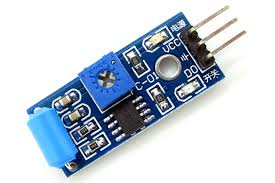
SW-420 vibration sensor module
The SW-420 Vibration Sensor Module is a digital vibration detection module built around a SW-420 vibration switch and an LM393 comparator chip. It senses vibration, shock, or sudden motion and outputs a simple HIGH/LOW digital signal — perfect for microcontrollers like Arduino, ESP32, Raspberry Pi, etc.
🔌 Electrical & Performance Specs
Parameter Value / Description
Operating Voltage 3.3 V – 5 V DC (works well with most microcontrollers)
Operating Current ~15 mA typical (depends on environment & LEDs)
Output Type Digital (Logic HIGH/LOW) — easy binary signal
Comparator IC LM393 (gives stable output)
Sensitivity Adjustment On-board potentiometer to tune trigger threshold
Indicator LEDs Power and output LEDs for visual feedback
PCB Size ~32 × 14 × 7 mm (compact)
Output Logic (typical) LOW when vibration detected, HIGH when idle
Sensor Type Normally-closed vibration switch
Operating Temp Range ~-40 °C to +85 °C (wide range for many environments)
🔍 How It Works (Simplified)
Vibration switch inside the SW-420 is normally closed (contacts connected).
When vibration/shock occurs, the internal mechanism breaks contact briefly.
That change is read by the LM393 comparator, which produces a clean digital signal.
The output pin toggles — typically LOW on vibration, HIGH when still — but this can depend on board wiring.
A potentiometer (trim pot) lets you dial the sensitivity up or down.
🔌 Typical Pinout
VCC → Power (+3.3 V to +5 V)
GND → Ground
DO → Digital Output
You’ll often see two LED indicators: one for power, one for output/signal status.
💡 Applications
This module is great for:
🚨 Alarm systems (detect knocks/impact on doors, windows, safes)
🤖 Robotics & automation triggers (e.g., bump detection)
🏠 Security detectors (vibration on appliances or structural elements)
🧪 DIY projects/experiments (detect motion, shakes, breaches)
🧠 Quick Usage Tips
Connect DO to a microcontroller digital pin and read HIGH/LOW.
Adjust the potentiometer gently to set how strong a vibration must be to trigger detection.
Keep in mind that very strong ambient vibration or noise can cause frequent triggering, so calibration is key.
📦 Example Arduino Logic (conceptual)
const int sensorPin = 2; // DO pin
void setup() {
pinMode(sensorPin, INPUT);
Serial.begin(9600);
}
void loop() {
int state = digitalRead(sensorPin);
if (state == LOW) {
Serial.println("Vibration detected!");
} else {
Serial.println("No vibration.");
}
delay(200);
}
No specifications available.
0.0
Based on 0 reviews
No reviews yet. Be the first to review this product!
Login to write a review.